
OKX demo trading (also known as paper trading) allows users to trade in a simulated environment using virtual funds, without risking real money.
It is designed to replicate real trading conditions, making it an ideal tool for both beginners and experienced traders.
What Is Demo Trading?
Demo trading is a simulated trading environment where users can:
- Trade with virtual funds
- Experience real market interfaces
- Practice trading strategies
The key difference is:
You are not using real money, so there is no financial risk.
Key Features of OKX Demo Trading
OKX provides a fully functional demo trading system that closely mirrors real trading.
1. Realistic Trading Experience
- Same interface as live trading
- Access to real trading tools
- Supports multiple trading modes
2. Multiple Trading Products
You can practice trading:
- Spot trading
- Margin trading
- Futures (contracts)
- Options
3. Virtual Funds Provided
Demo accounts come with initial virtual balances in multiple cryptocurrencies, allowing users to start trading immediately.
Important Notes
- Demo trading is completely independent from live trading
- Market data and price movements may not exactly match real markets
- Trading results do not affect real assets
This means demo trading should be used for learning and testing, not for predicting real profits.
How to Start OKX Demo Trading
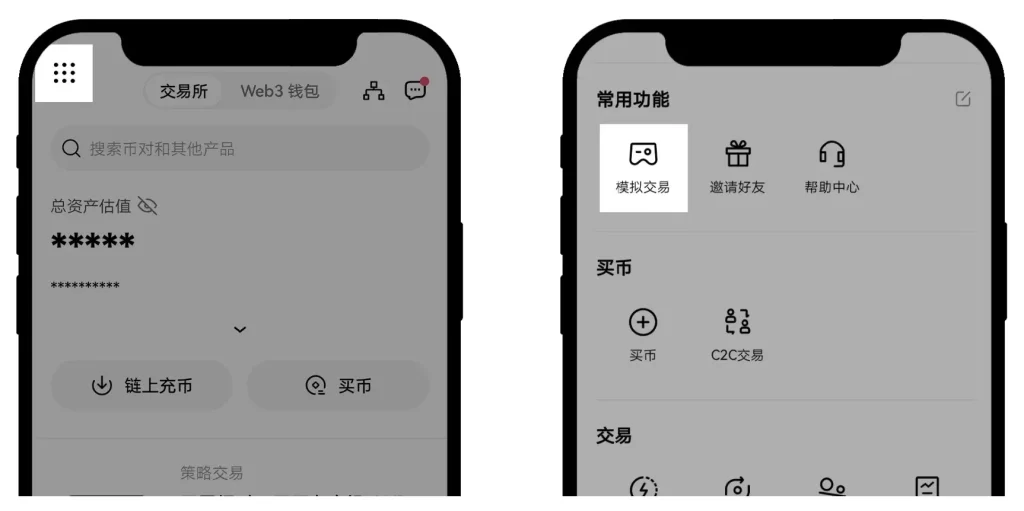
App Version
- Open the OKX App
- Log in to your account
- Tap the top-left menu icon
- Go to Personal Center → Demo Trading
Inside the demo trading interface, you can:
- View total assets
- Check available tokens
- Start trading directly
Click Trade to begin:
- Spot trading
- Margin trading
- Futures trading
- Strategy trading
Web Version
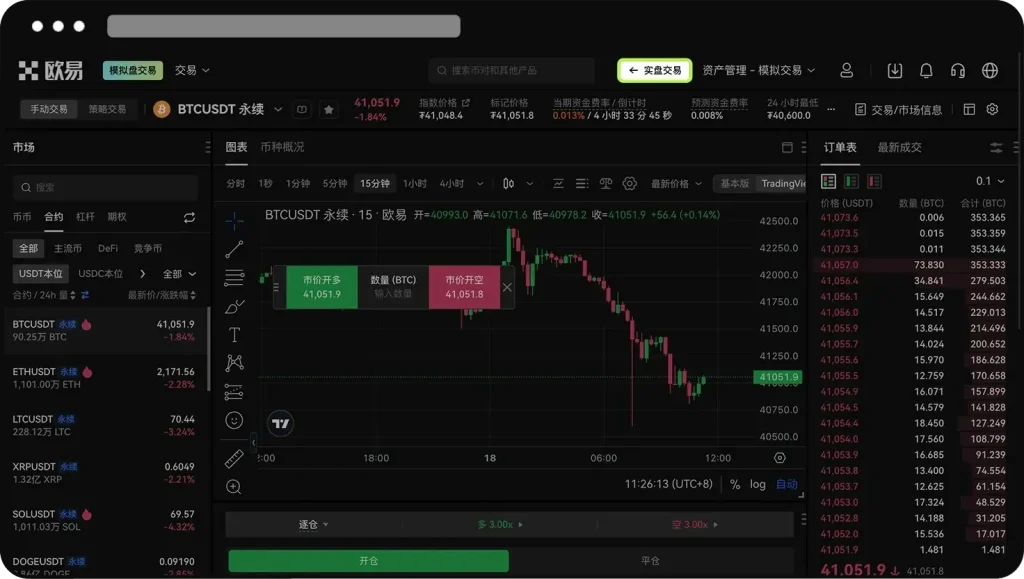
- Visit the OKX official website
- Log in to your account
- Click Trade
- Select Demo Trading
You will see a Demo Trading label at the top to distinguish it from live trading.
To switch back:
Click Live Trading in the top-right corner.
How to Reset Demo Account Funds
If you run out of virtual funds or want to restart:
- Go to the Assets page
- Click Reset
This will refresh your demo balance and token allocation.
Why Demo Trading Is Important
For Beginners
- Learn trading basics without risk
- Understand how the platform works
- Avoid costly mistakes
For Experienced Traders
- Test new strategies
- Optimize trading systems
- Improve decision-making confidence
Frequently Asked Questions
Does OKX demo trading support all assets?
It supports a wide range of cryptocurrencies, but they are virtual assets used only for simulation.
What trading types are supported?
- Spot
- Margin
- Futures
- Options
Can I create sub-accounts in demo trading?
No. Demo trading does not support sub-account features.
Does demo trading reflect real market conditions?
It simulates real market behavior, but data and execution may differ from live trading.
Recommended for Getting Started
If you want to practice demo trading and later switch to real trading, you can register here:
https://oyidl.net/ul/6CngT5?channelId=OY1888
Register through this link to receive a 20% trading fee rebate.
Suitable for:
- Beginners learning trading
- Strategy testing
- Transitioning to real trading
Summary
OKX demo trading is a powerful tool that allows you to:
Practice trading with zero risk
Test strategies before entering the real market
Build confidence and experience
Disclaimer
This content is based on OKX official features and general trading practices. Demo trading results do not guarantee real trading performance.