

When using a crypto wallet to send assets, a common issue users face is:
You don’t have enough gas fees, so the transaction cannot be completed.
The simplest solution is to withdraw the required network token from an exchange to your wallet.
1. Why Are Gas Fees Required?
Every blockchain transaction requires a network fee (Gas).
Different networks use different native tokens:
- TRON → TRX
- Ethereum → ETH
- BNB Chain → BNB
For example:
If you transfer USDT on the TRON network, you must have TRX in your wallet to pay the fee.
2. How to Top Up Gas Fees via Exchange Withdrawal (TRX Example)
If your wallet cannot swap assets for gas fees, you can directly withdraw from an exchange.
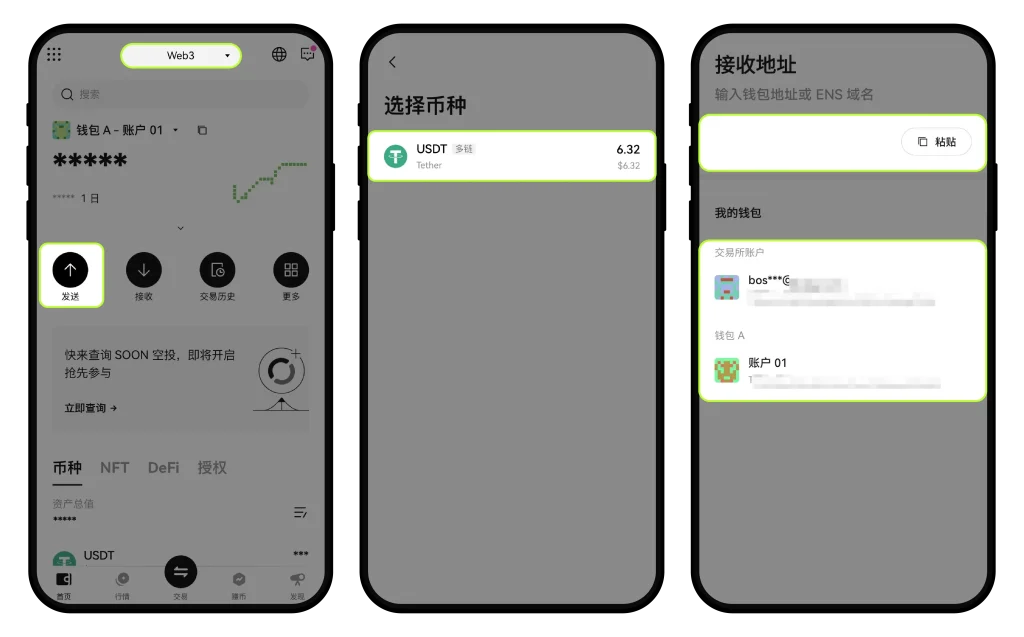
Step 1: Go to Send Page
Open the exchange app
Navigate to:
Exchange → Web3 Wallet → Send
Then:
- Select asset (TRX)
- Select network (TRON)
- Enter the receiving wallet address
Step 2: Enter Amount
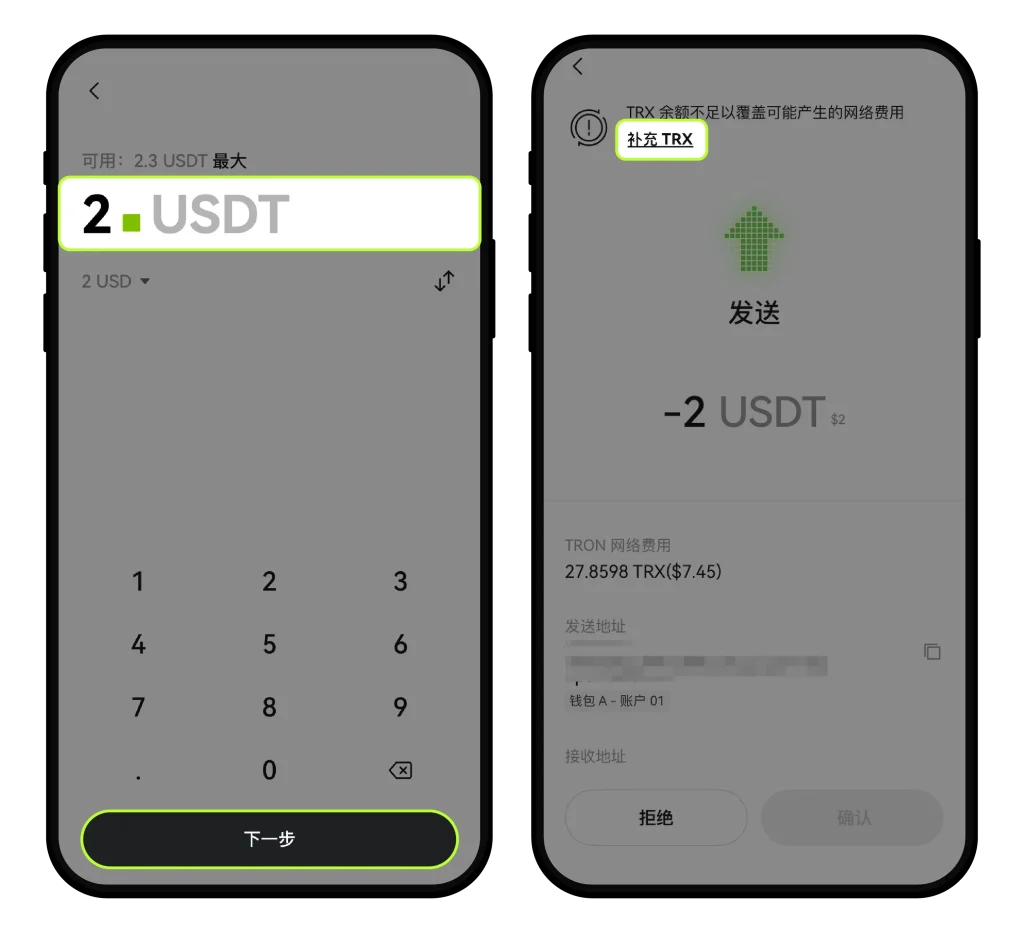
Enter the amount of TRX you want to transfer
Click:
Next → Top up TRX
Step 3: Withdraw from Exchange
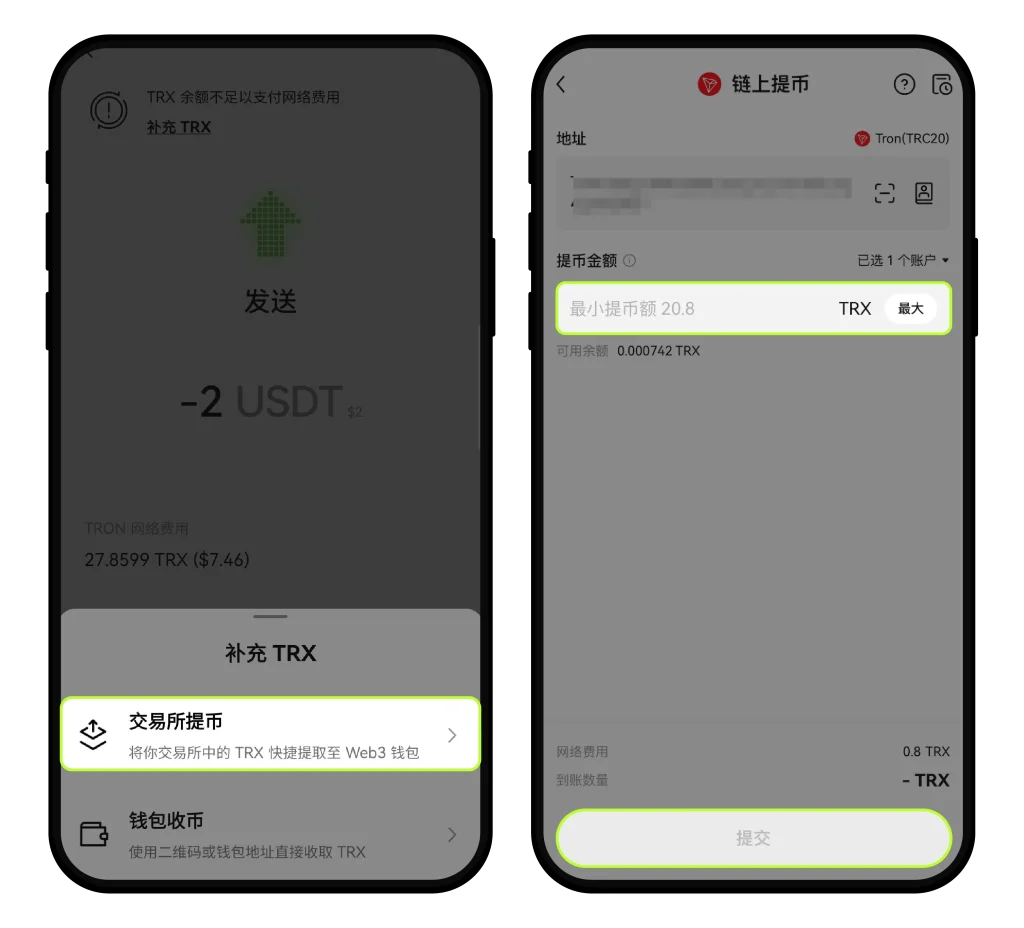
Select:
Withdraw from Exchange
Then:
- Enter withdrawal amount
- Click Submit
Once completed, the TRX will arrive in your wallet and can be used as gas fees.
3. Important Notes
- Each token has a minimum withdrawal amount
- Transaction speed depends on network confirmation
- Always double-check the network before confirming (wrong network may result in permanent loss)
4. What If “Withdraw from Exchange” Option Is Missing?
This usually means:
Your wallet is not linked to your exchange account
Solution:
- Connect your wallet with the exchange account
- Re-enter the process
5. Additional Notes
- OKX Wallet App may not support direct “exchange withdrawal” in some cases
- You can still top up gas fees by receiving tokens normally
6. Practical Tips
Most users run into problems because they do not prepare gas fees in advance.
Recommended approach:
- Always keep a small amount of native tokens (TRX, ETH, BNB)
- Do not wait until the moment you need to send funds
- Test with a small transaction before large transfers
7. Get TRX Easily (Recommended for Beginners)
If you don’t have an exchange account yet, you can use the following:
https://oyidl.net/ul/6CngT5?channelId=OY1888
Register through this link to receive a 20% trading fee rebate.
Suitable for:
- Topping up gas fees
- Spot trading
- Futures trading
Summary
Topping up gas fees via exchange withdrawal is simple:
If you don’t have gas, just transfer the network token into your wallet.
This is the most direct and commonly used solution.
Disclaimer
This content is based on official OKX processes and is for informational purposes only. Please refer to the platform for the most up-to-date rules.